# C# code for new API Key
**URL:** https://integration.keap.com/t/c-code-for-new-api-key/92942
**Category:** API Q&A
**Created:** [July 25, 2024, 12:37pm UTC](https://integration.keap.com/t/c-code-for-new-api-key/92942 "2024-07-25T12:37:30Z")
**Posts on this page:** 20
**Page:** 1
### Author:  [@Doug\_Carey](https://integration.keap.com/u/Doug_Carey)
#### Post date: [July 25, 2024, 12:37pm UTC](https://integration.keap.com/t/c-code-for-new-api-key/92942/1 "2024-07-25T12:37:30Z")
I would like sample C# code that shows how to use the new API key to set a tag for a contact.
---
### Author:  [@Marion\_Dorsett2](https://integration.keap.com/u/Marion_Dorsett2)
#### Post date: [July 25, 2024, 1:41pm UTC](https://integration.keap.com/t/c-code-for-new-api-key/92942/2 "2024-07-25T13:41:30Z")
@Doug_Carey I would suggest downloading the Postman app, and if you can build out the request there it can give you the code you’re looking for.
My C# skills are not up with my PHP skills, but I was able to generate the request in Postman, and then I can copy the provided code and modify as needed.
This is the code I took from Postman and it may help point you in the right direction:
```auto
var client = new HttpClient();
var request = new HttpRequestMessage(HttpMethod.Post, "https://api.infusionsoft.com/crm/xmlrpc/v1");
request.Headers.Add("X-Keap-API-Key", "YOUR_KEAP_SAK_GOES_HERE");
var content = new StringContent("\r\n\r\n ContactService.addToGroup\r\n \r\n \r\n YOUR_KEAP_SAK_GOES_HERE\r\n \r\n \r\n CONTACT_ID_GOES_HERE\r\n \r\n \r\n TAG_ID_GOES_HERE\r\n \r\n \r\n\r\n\r\n", null, "application/xml");
request.Content = content;
var response = await client.SendAsync(request);
response.EnsureSuccessStatusCode();
Console.WriteLine(await response.Content.ReadAsStringAsync());
```
---
### Author:  [@Pav](https://integration.keap.com/u/Pav)
#### Post date: [July 25, 2024, 7:48pm UTC](https://integration.keap.com/t/c-code-for-new-api-key/92942/3 "2024-07-25T19:48:31Z")
To all C# developers,
If you do a search in the forum you will find old C# code examples. Some of the forum posts refer to the EventDay C# Wrapper, unfortunately it has not been updated for 6 years now, and will be based on the Legacy API Key.
@TomScott, all the SDK Examples include the C# one are several years old and are based on the Legacy API Key. They all need to be updated to use the Service Account Key. I am sure other developers will be raising questions on how to do the necessary changes in other programming languages.
---
### Author:  [@bradb](https://integration.keap.com/u/bradb)
#### Post date: [July 26, 2024, 12:25am UTC](https://integration.keap.com/t/c-code-for-new-api-key/92942/4 "2024-07-26T00:25:09Z")
The only one Keap owns is the `infusionsoft-php` one. The other ones are community driven. We are trying to progress to a model where we publish SDKs for many languages but we are not there yet.
---
### Author:  [@Pav](https://integration.keap.com/u/Pav)
#### Post date: [July 26, 2024, 2:00pm UTC](https://integration.keap.com/t/c-code-for-new-api-key/92942/5 "2024-07-26T14:00:38Z")
@bradb, as a suggestion, I recommend that you remove the Code Sample references from the documentation, otherwise it will confuse developers.
---
### Author:  [@Doug\_Carey](https://integration.keap.com/u/Doug_Carey)
#### Post date: [July 29, 2024, 1:22pm UTC](https://integration.keap.com/t/c-code-for-new-api-key/92942/7 "2024-07-29T13:22:02Z")
Marion: Thanks, this worked! Using a similar idea, how do I retrieve the Contact\_ID using the contact’s email address?
---
### Author:  [@Marion\_Dorsett2](https://integration.keap.com/u/Marion_Dorsett2)
#### Post date: [July 29, 2024, 1:53pm UTC](https://integration.keap.com/t/c-code-for-new-api-key/92942/8 "2024-07-29T13:53:12Z")
Give this a try…
```auto
var client = new HttpClient();
var request = new HttpRequestMessage(HttpMethod.Post, "https://api.infusionsoft.com/crm/xmlrpc/v1");
request.Headers.Add("X-Keap-API-Key", "YOUR_KEAP_SAK_GOES_HERE");
var content = new StringContent("\r\n\r\n ContactService.findByEmail\r\n \r\n \r\n YOUR_KEAP_SAK_GOES_HERE\r\n \r\n \r\n SEARCH_FOR_THIS_EMAIL\r\n \r\n \r\n \r\n \r\n Id\r\n FirstName\r\n LastName\r\n \r\n \r\n \r\n \r\n", null, "application/xml");
request.Content = content;
var response = await client.SendAsync(request);
response.EnsureSuccessStatusCode();
Console.WriteLine(await response.Content.ReadAsStringAsync());
```
---
### Author:  [@Doug\_Carey](https://integration.keap.com/u/Doug_Carey)
#### Post date: [July 29, 2024, 6:53pm UTC](https://integration.keap.com/t/c-code-for-new-api-key/92942/9 "2024-07-29T18:53:04Z")
Thanks. Where are you finding method calls such as `ContactService.findByEmail`? Where do I see the documentation for method calls to use?
---
### Author:  [@Marion\_Dorsett2](https://integration.keap.com/u/Marion_Dorsett2)
#### Post date: [July 29, 2024, 7:30pm UTC](https://integration.keap.com/t/c-code-for-new-api-key/92942/10 "2024-07-29T19:30:39Z")
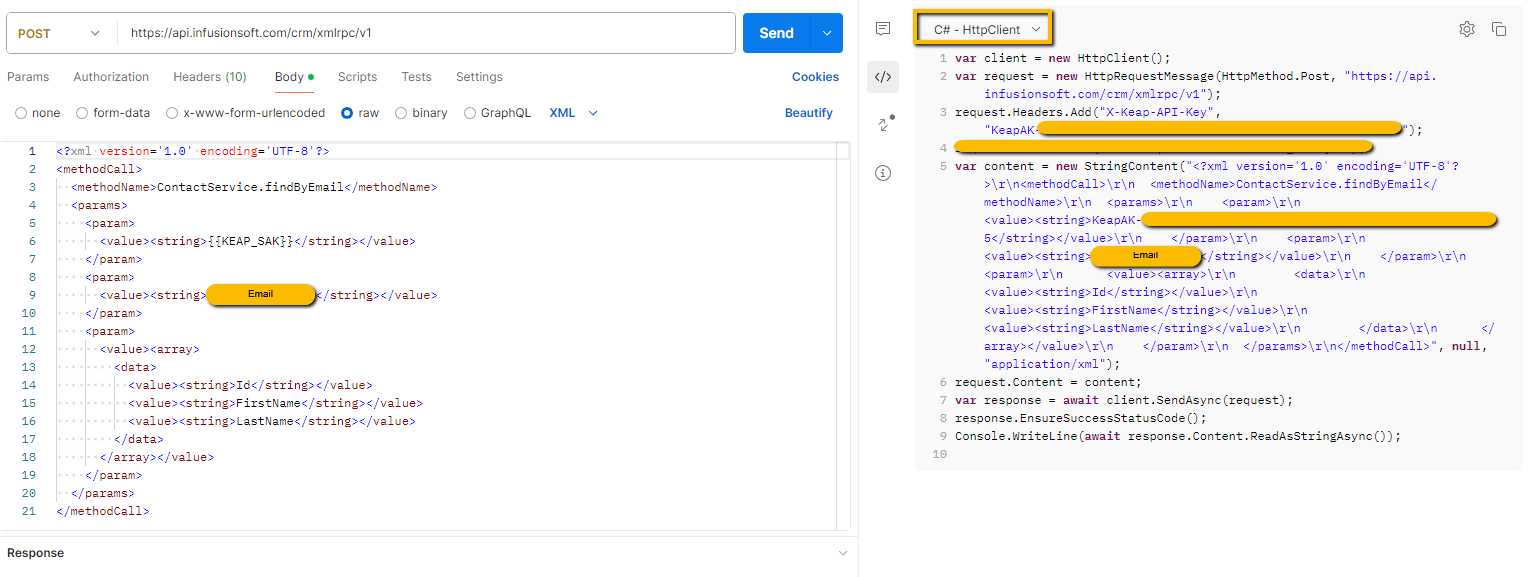
It’s listed in the Documenation:

[https://developer.infusionsoft.com/docs/xml-rpc/](https://developer.infusionsoft.com/docs/xml-rpc/)
I just copied the XML, pasted it into Postman, and made the request, and then extracted the C# code.
---
### Author:  [@Doug\_Carey](https://integration.keap.com/u/Doug_Carey)
#### Post date: [July 30, 2024, 12:28pm UTC](https://integration.keap.com/t/c-code-for-new-api-key/92942/11 "2024-07-30T12:28:52Z")
Thanks again! Do you know if there is a way to test which calls will fail and what will succeed once Keap moves to the new authentication key?
---
### Author:  [@Marion\_Dorsett2](https://integration.keap.com/u/Marion_Dorsett2)
#### Post date: [July 30, 2024, 3:30pm UTC](https://integration.keap.com/t/c-code-for-new-api-key/92942/12 "2024-07-30T15:30:27Z")
Keap has stated that any requests to the XMLRPC using the legacy API key is all that will fail.
Provided that you’re using a PAT or SAK and accessing the XMLRPC w/ the new URL endpoint and header requirement, nothing should fail.
Any OAuth requests are unaffected.
---
### Author:  [@Doug\_Carey](https://integration.keap.com/u/Doug_Carey)
#### Post date: [July 30, 2024, 3:45pm UTC](https://integration.keap.com/t/c-code-for-new-api-key/92942/13 "2024-07-30T15:45:53Z")
Thanks. I believe I can use my current code and just insert the new key. But when I do that, I get an error of “Unauthorized” when calling findByEmail. Example code is below. The variable key is my new key. I did get this new key to work when I used your sample code from before so the key is valid. Any idea what might be wrong here?
string url = “[https://api.infusionsoft.com/crm/xmlrpc/v1](https://api.infusionsoft.com/crm/xmlrpc/v1)”;
((XmlRpcClientProtocol)proxy).Url = url;
((XmlRpcClientProtocol)proxy).Headers[“Authorization”] = "Bearer " + key;
```
//Create a struct to hold the contact records data
try
{
email = UserName;
XmlRpcStruct conDat = new XmlRpcStruct();
iFace proxysignup = XmlRpcProxyGen.Create();
XmlRpcStruct[] contacts = proxysignup.findByEmail(key, email, new[] { "Id", "FirstName", "LastName" });
```
---
### Author:  [@Marion\_Dorsett2](https://integration.keap.com/u/Marion_Dorsett2)
#### Post date: [July 30, 2024, 4:58pm UTC](https://integration.keap.com/t/c-code-for-new-api-key/92942/14 "2024-07-30T16:58:07Z")
> [@Doug\_Carey](#):
>
> rs[“Authorization”] = "Bearer " + key;
That authorization would be for the OAuth. The SAK uses a different header:
`rs["X-Keap-API-Key"] = key;`
---
### Author:  [@Doug\_Carey](https://integration.keap.com/u/Doug_Carey)
#### Post date: [July 31, 2024, 7:45pm UTC](https://integration.keap.com/t/c-code-for-new-api-key/92942/15 "2024-07-31T19:45:14Z")
Thanks. I thought that would work, but I still get “Unauthorized” when calling findByEmail. My code is below.
iFace proxy = XmlRpcProxyGen.Create();
```
//Make sure our text boxes are not null.
string url = "https://api.infusionsoft.com/crm/xmlrpc/v1";
((XmlRpcClientProtocol)proxy).Url = url;
((XmlRpcClientProtocol)proxy).Headers["X-Keap-API-Key"] = key;
//Create a struct to hold the contact records data
try
{
//SetTagForContact2(1, 1);
email = UserName;
XmlRpcStruct conDat = new XmlRpcStruct();
iFace proxysignup = XmlRpcProxyGen.Create();
XmlRpcStruct[] contacts = proxysignup.findByEmail(key,email, new[] { "Id", "FirstName", "LastName" });
```
---
### Author:  [@Pav](https://integration.keap.com/u/Pav)
#### Post date: [August 2, 2024, 2:53pm UTC](https://integration.keap.com/t/c-code-for-new-api-key/92942/16 "2024-08-02T14:53:46Z")
Hi @Doug_Carey,
Interesting, someone else reported the same issue a few years ago in this forum post, but no one replied to it.
> [@Getting unauthorized error when calling api's](https://integration.keap.com/t/getting-unauthorized-error-when-calling-apis/75398):
>
> Hi Team, I’m using [GitHub - EventDay/Infusionsoft.net: A C# Wrapper around the Infusionsoft.com API](https://github.com/EventDay/Infusionsoft.net) SDK for calling infusionsoft API , using OAuth() for authentication which is working fine. { //LegacyAuth(); OAuth(); } But getting null API key in below method or when passing the hard coded API key getting unauthorized error. protected ServiceBase(IInfusionSoftConfiguration configuration, IMethodListenerProvider listenerProvider) { MethodListenerProvider = listenerProvider; Configurat…
Have you tried calling any other API method? For example, what happens if you query the Contacts?
Is this a Service Account Key or Personal Access Token?
---
### Author:  [@Pav](https://integration.keap.com/u/Pav)
#### Post date: [August 2, 2024, 3:40pm UTC](https://integration.keap.com/t/c-code-for-new-api-key/92942/17 "2024-08-02T15:40:59Z")
@Doug_Carey, I checked out Marion code and it worked all okay using the Service Account Key.
Here is a revision of the code with the XML expanded. Note, I am not a C# programmer either.
Make sure you set the “key” and “email” strings.
```cs
string key = " ****SERVICE ACCOUNT KEY****";
string email = " ****EMAIL ADDRESS****";
var client = new HttpClient();
var request = new HttpRequestMessage(HttpMethod.Post, "https://api.infusionsoft.com/crm/xmlrpc/v1");
request.Headers.Add("X-Keap-API-Key", key);
string xml = $"""
ContactService.findByEmail
{email}
Id
FirstName
LastName
Email
""";
request.Content = new StringContent(xml, null, "application/xml");
var response = await client.SendAsync(request);
response.EnsureSuccessStatusCode();
Console.WriteLine(await response.Content.ReadAsStringAsync());
```
---
### Author:  [@Marion\_Dorsett2](https://integration.keap.com/u/Marion_Dorsett2)
#### Post date: [August 2, 2024, 5:19pm UTC](https://integration.keap.com/t/c-code-for-new-api-key/92942/18 "2024-08-02T17:19:53Z")
@Doug_Carey I’m guessing that the XmlRpcClientProtocol class isn’t passing the additional header as intended because that custom header is outside of the XMLRPC standard.
I would guess that either you have to pass ALL of the headers, or use the long form HttpClient request.
```auto
((XmlRpcClientProtocol)proxy).Headers["X-Keap-API-Key"] = key;
((XmlRpcClientProtocol)proxy).Headers["Content-Type"] = "application/xml";
```
---
### Author:  [@Doug\_Carey](https://integration.keap.com/u/Doug_Carey)
#### Post date: [August 2, 2024, 6:54pm UTC](https://integration.keap.com/t/c-code-for-new-api-key/92942/19 "2024-08-02T18:54:55Z")
I added ((XmlRpcClientProtocol)proxy).Headers[“Content-Type”] = “application/xml”; and I get the same error. I was told by Keap that all of my existing code should work using the new key. But it’s not working. Is there an API team at Keap I can talk to about this?
---
### Author:  [@Marion\_Dorsett2](https://integration.keap.com/u/Marion_Dorsett2)
#### Post date: [August 2, 2024, 7:24pm UTC](https://integration.keap.com/t/c-code-for-new-api-key/92942/20 "2024-08-02T19:24:12Z")
You can submit a ticket here:
[https://developer.infusionsoft.com/get-support/](https://developer.infusionsoft.com/get-support/)
---
### Author:  [@Pav](https://integration.keap.com/u/Pav)
#### Post date: [August 2, 2024, 7:39pm UTC](https://integration.keap.com/t/c-code-for-new-api-key/92942/21 "2024-08-02T19:39:41Z")
@Doug_Carey, it looks like you are using Cook Computing XML-RPC Library for the XML requests.
If you follow the examples given, it should be a straight forward change to the URL and just add the Header for the submission. But, it looks like something else may need to be altered in your code to make it fully work.
Keap has recently updated their Legacy Key Migration with a C# example, but is a simple example of what needs to be changed.
[https://developer.infusionsoft.com/legacy-key-migration/](https://developer.infusionsoft.com/legacy-key-migration/)
Unfortunately there is a lack of C# developers around in this forum.
[Next page](https://integration.keap.com/t/c-code-for-new-api-key/92942.md?page=2)